

Demo at the moment of interest
The visitor gets the demo while they are curious, not after three emails and a calendar link.
Your best demo, given by an artificial human the moment someone asks. It presents the product, answers from your documentation, shows the numbers on screen and books the follow-up, in 70+ languages.
Request a demoDemo request
Head of Operations
Today with Sophie
Follow-up booked1. Demo
2. Next step
Built with world-class AI, backed by leading startup ecosystems










A visitor asks for a demo. Thirty seconds later, they are in one.
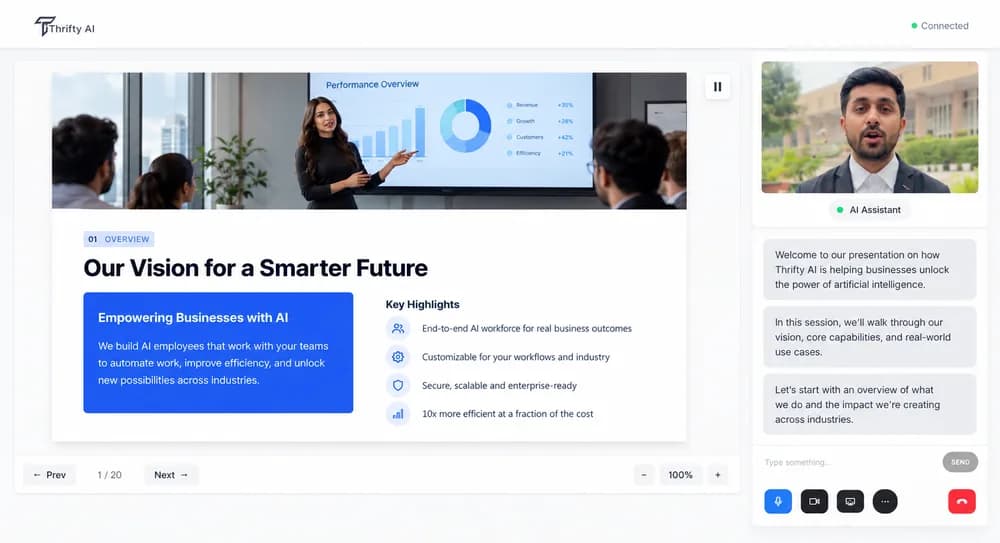
Presentation mode turns your deck and docs into a demo the avatar can give and adapt.
Pricing, security, integrations and limits, grounded in what your team approved.
Magic Canvas draws charts, comparisons and take-away PDFs on screen during the demo.
Every demo ends with a calendar slot and a CRM record, not a thank-you page.
The visitor gets the demo while they are curious, not after three emails and a calendar link.
Every demo uses the approved deck and the approved answers, with guardrails you control.
Embeds on any page, joins Meet and Zoom calls, syncs to your CRM and runs at events on a kiosk or HoloBox.
See the platformBuild the presenter from a photo, or clone your best solutions engineer with their consent.
Create your avatarDemo requests wait days for a slot, some bookings never show, and the visitor's interest has faded by the time a rep calls.
A Thrifty AI avatar gives the demo the moment a visitor asks, on your website, a shareable link, or inside Meet and Zoom. It presents your deck, answers from your docs and books the next call.
Qualifies the visitor first, then moves into the demo and books the meeting.
On a HoloBox or kiosk at your stand, the same demo runs in the visitor's language.
Demos, onboarding and support avatars for software and hardware products.
Upload the deck and docs, choose the presenter and embed it, without code.
Thrifty AI does not publish customer benchmarks for this page yet. Measure these during the pilot and compare with your baseline:
1. Discovery
Week 1
Watch your best rep's demo. Pick the two buyer personas and the pages where visitors ask for a demo.
2. Build
Week 2–3
Create the presenter, load the deck into presentation mode, add docs, pricing and the security pack, connect the CRM and calendars.
3. Pilot
Week 4–6
Run on one product page. Measure demos given, follow-ups booked and escalations, and review transcripts with product marketing weekly.
4. Rollout
Week 7 onward
Add pages, personas, languages and the event kiosk. Hand over or keep the AI FDE team on retainer.
You upload the deck, documentation, pricing and security pack. Presentation mode turns the deck into a demo it can narrate and adapt. Every answer is grounded in those documents and cites the page.
No. Guardrails keep it to what your documents say, and it says plainly when a feature does not exist yet. Competitor questions get your approved comparison and nothing beyond it.
Yes. It steps through your product deck and screenshots in presentation mode. With Magic Canvas it draws charts for the visitor's own numbers, puts two plans side by side and generates a take-away PDF.
Yes, with their consent. Their likeness and voice become an avatar that gives every demo in their style. You can also build the presenter from a photo or a prompt.
Cloud plans are priced per live avatar minute, from $0.04 per minute at scale. Self-hosting in your VPC is an annual licence plus a per-minute rate. See /plans.
Want this built for you? Our forward-deployed engineers scope, build and run it with your team.
Talk to an AI FDEExplore other Thrifty AI solutions


